Haskell with React Native?
Haskell compilation for iOS and integration with JSI
· 10 min read
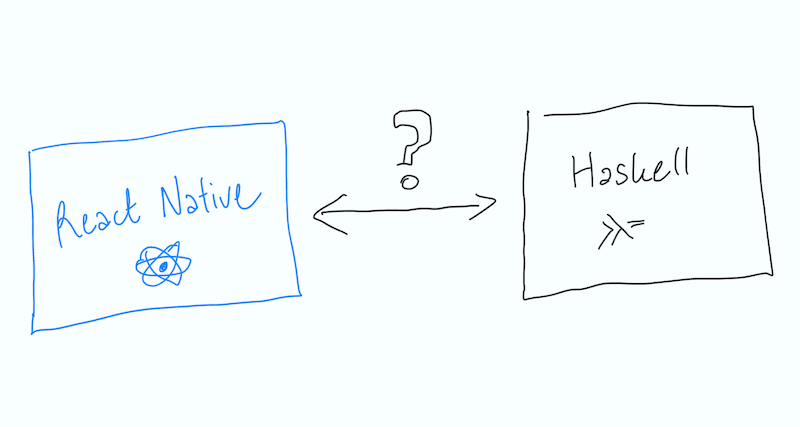
This article consists of my informal notes on an attempt to integrate the Haskell runtime with a React Native app. This is definitely not an approach worth using in a fully production environment (at least in my opinion), but it does help illustrate many key issues related to compiling Haskell without typical cross-compilation support, as well as integration mechanisms with React Native via Turbo Modules and JSI. The first attempt described here focuses exclusively on compiling for iOS and uses some clever tricks to modify the compilation results for macOS. I don’t describe the exact commands I ran; rather, I outline the general approach and the problems I encountered (and how I solved them). I’ve included the code repository below, so if you’re interested in the specifics of what I did, just take a look there.
This post might help someone, but I’m mainly leaving it here for myself to document the entire process I had to go through so I can do it faster in the future :)
Why Haskell?
It’s a fully functional language that offers an interesting change of pace from the languages I work with on a daily basis. I’ve actually been working with it since college, but I’ve become more proficient thanks to additional projects and (perhaps more importantly) by teaching functional programming courses to students. It’s a language you simply can’t ignore: one that helps explain functional programming concepts that can largely be applied to other languages (e.g., using monads in JavaScript... could there be anything better?).
The goal of my PoC will be to call functions defined in Haskell from JavaScript code within the React Native environment. This means it will be necessary to compile the Haskell code into ARM64 machine code (the iPhone architecture) and execute it within the same process as the rest of the application.
The workflow would look like this:
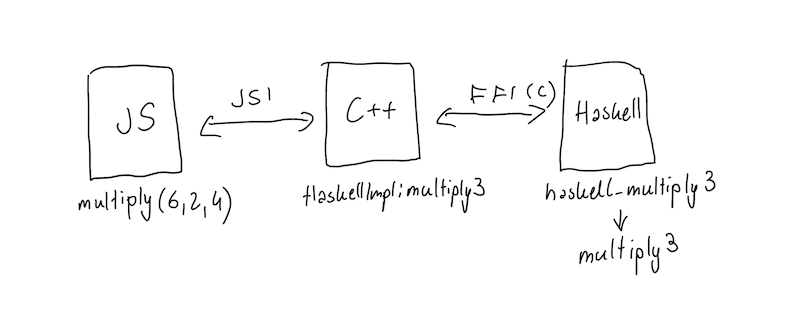
Three layers, three different technologies. And three boundaries to cross. Let’s look at two functions as examples:
multiply3(a,b,c)– that is, simple multiplication of three numbers.greet(name)– a function that takes a string, thereby requiring bidirectional marshalling and cross-language memory management.
Marshalling is simply the translation of data between the representations of two environments. A Haskell String is a list of Unicode characters but allocated on the GHC heap. A C string is a zero-terminated byte sequence. And then there’s the representation for JavaScript. In our application, we use the Hermes engine, but that doesn’t really concern us because JSI will handle everything.
Compiling Haskell into a static library
Our main goal will be to compile Haskell functions into a simple library (in our case, a static one, because the linker will extract only the elements it actually needs). The most important concept for us is the so-called ABI, or Application Binary Interface: a set of rules defining how our code should behave after compilation, such as which registers hold arguments, who cleans up the stack and when, how we arrange fields in structures, and so on.
The trick is that Arm64 for iOS and Arm64 for macOS have identical ABIs. This means the machine instructions are identical, and the processors in iPhones and the processors in Macs (of course, this only applies to the M-series processors) belong to the same family.
Here’s an important aside about Mach-O files. This is the executable file format for macOS (or other systems based on the Mach kernel). Each such file consists of
- a header: containing important information about the file, the processor architecture, and a checksum.
- a list of load commands for the loader and linker
- a data section: in other words, everything else :)
One of the load commands is LC_BUILD_VERSION, which specifies that “this file was built for platform X, version Y or higher.” Apple’s linker refuses to mix files intended for different platforms.
Example:
      cmd LC_BUILD_VERSION
  cmdsize 32
 platform 1
    minos 26.0
      sdk n/a
1 = macOS, and 26.0 indicates a minimum macOS requirement of 26.0. The code bytes in this file are 100% correct for iOS. Only the label is incorrect.
The rest of the process goes like this:
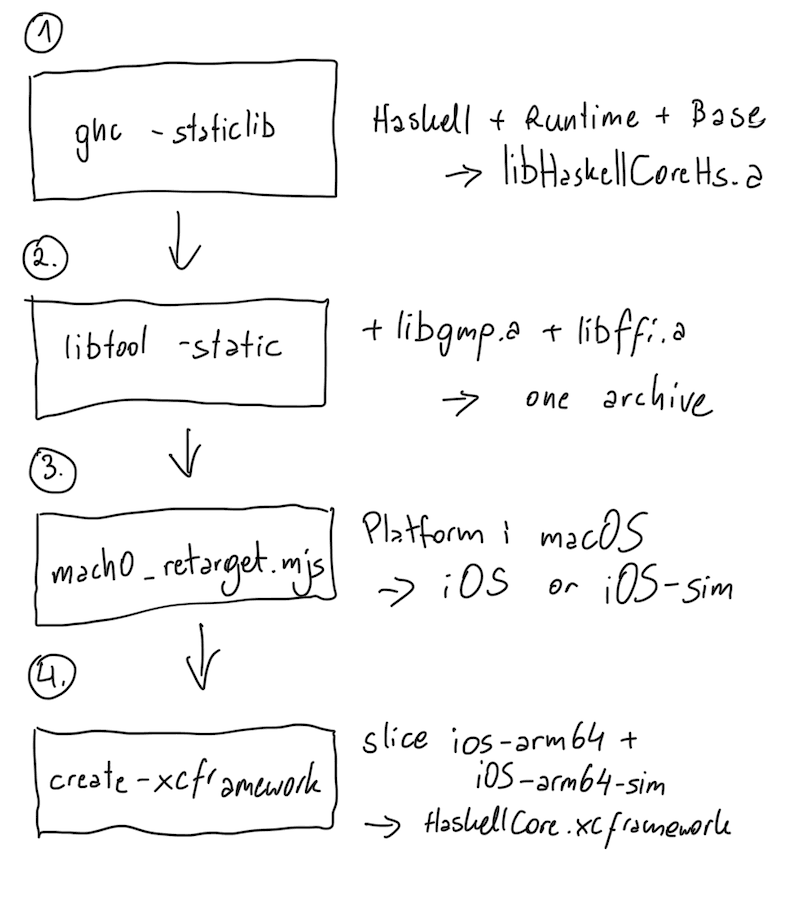
Important note: The simulator is a separate platform. If you want your library to work on both the simulator and an iOS device, you need to have two separate versions.
Important (or very important) notes
- Some system functions from the macOS API are not available. If Haskell were to call something that iOS doesn’t have, either the linker would fail or the app would crash at runtime. You need to be very careful about this.
- What we’re doing here is not a supported solution. On the contrary, it’s a technical blunder, and using it in production is asking for trouble, especially since there’s no telling what Apple might come up with in future updates and for new devices.
Well, let's get building
My goal will be to create a library for React Native that implements the two features mentioned earlier. To do this, we’ll use bob’s builder: a handy library for creating libraries. We’ll simply select the turbo-module option from C++:
npx create-react-native-library@latest react-native-haskellThis will generate a few files needed to link the library via JSI. We won’t touch the ios/OnLoad.mm file because Bob has already taken care of everything there for us and registered the Turbo module.
I won’t even mention that we need the React Native runtime and the GHC compiler for Haskell, since that’s pretty obvious. We’ll also need the Cabal package manager, because we’ll require additional libraries to make everything work. So:
ghc --print-target-platform # this should output: aarch64-apple-darwin
cabal --version             # this should also work
Haskell layer
I'm creating a directory named /haskell in the library directory, and inside it, a file named HaskellCore.hs. This file will contain all the functions we want to use. It will look like this:
module HaskellCore
  ( multiply3
  , greet
  ) where

import Data.Char (toUpper)
import Data.Int (Int64)

multiply3 :: Int64 -> Int64 -> Int64 -> Int64
multiply3 a b c = a * b * c

greet :: String -> String
greet name =
  "Hello, " <> display <> "! Characters: " <> show (length trimmed)
    <> ", reversed: " <> reverse trimmed
  where
    trimmed = trim name
    display = map toUpper trimmed

trim :: String -> String
trim = dropWhile isSpace . reverse . dropWhile isSpace . reverse
  where
    isSpace ch = ch `elem` (" \t\n\r" :: String)
I won’t explain Haskell syntax here, because you can find that information elsewhere. The two most important functions are, of course, multiply3 and greet. It’s simple.
The next file is our FFI (Foreign Function Interface) layer. It allows the language to call code written in another language and to be called by it. So if you see a foreign import somewhere, it means Haskell is calling C, and if you see a foreign export, it means C is calling Haskell. We’re actually interested in the latter, for example:
foreign export ccall "haskell_multiply3" c_multiply3
  :: CLLong -> CLLong -> CLLong -> IO CLLong
CLLong is the equivalent of the long long type in C.
If we run the following command on such a file:
ghc --make -ddump-foreign -no-link -ihaskell/src haskell/src/HaskellCore/Exports.hsThen we can take a look at the code output by that file:
extern StgClosure HaskellCoreziExports_zdfstable..._closure;

HsInt64 haskell_multiply3(HsInt64 a1, HsInt64 a2, HsInt64 a3)
{
    Capability *cap;
    HaskellObj ret;
    HsInt64 cret;

    cap = rts_lock();
    rts_inCall(&cap,
        rts_apply(cap, (HaskellObj)runIO_closure,
            rts_apply(cap,
                rts_apply(cap,
                    rts_apply(cap, &..._closure, rts_mkInt64(cap, a1)),
                    rts_mkInt64(cap, a2)),
                rts_mkInt64(cap, a3))),
        &ret);
    rts_checkSchedStatus("haskell_multiply3", cap);
    cret = rts_getInt64(ret);
    rts_unlock(cap);
    return cret;
}
All in all, there are a few interesting things here.
The triple call to rts_apply is actually just the way functions are written in Haskell. A three-argument function is, in essence, three single-argument functions underneath (currying: one of the key concepts in functional programming).
Haskell is a lazily evaluated language, meaning values are computed only when they’re needed. In our case, however, we always need the result (since we have to pass something to the C code), so the call itself is synchronous, and the C++ thread will wait until Haskell finishes its calculations. And the consequence of this is that if we don’t do anything about it, a long computation in Haskell will block our JavaScript thread.
So our code for both functions looks like this:
{-# LANGUAGE ForeignFunctionInterface #-}

module HaskellCore.Exports () where

import Foreign.C.String (CString)
import Foreign.C.Types (CLLong (..))
import Foreign.Marshal.Alloc (free)
import Foreign.Ptr (nullPtr)
import GHC.Foreign (newCString, peekCString)
import GHC.IO.Encoding (utf8)

import qualified HaskellCore

foreign export ccall "haskell_multiply3" c_multiply3
  :: CLLong -> CLLong -> CLLong -> IO CLLong

foreign export ccall "haskell_greet" c_greet
  :: CString -> IO CString

foreign export ccall "haskell_free_string" c_freeString
  :: CString -> IO ()

c_multiply3 :: CLLong -> CLLong -> CLLong -> IO CLLong
c_multiply3 a b c =
  pure (fromIntegral (HaskellCore.multiply3 (fromIntegral a) (fromIntegral b) (fromIntegral c)))

c_greet cstr
  | cstr == nullPtr = newCString utf8 (HaskellCore.greet "")
  | otherwise = do
      name <- peekCString utf8 cstr
      newCString utf8 (HaskellCore.greet name)

c_freeString :: CString -> IO ()
c_freeString ptr
  | ptr == nullPtr = pure ()
  | otherwise = free ptr
Runtime
In Haskell, we have a built-in runtime that includes all the necessary mechanisms, such as a garbage collector and a thread scheduler. We need it to run our code. So we have to initialize it. Here, we use pthread_once to ensure that the function runs only once, even if we call it from other threads.
static pthread_once_t g_init_once = PTHREAD_ONCE_INIT;

void haskell_core_init(void) {
    pthread_once(&g_init_once, haskell_core_start_rts);
}
I don't close the runtime in my code, because there's really no need to. The runtime lives as long as the process.
One major issue I ran into here was the default maximum memory size reserved by the runtime. For some reason, the default value is 1TB, and while macOS has no problem with this, iOS does. The -xr flag solved the problem, and I reduced that size to 512MB.
RtsConfig conf = defaultRtsConfig;
conf.rts_opts = "-xr512m";
hs_init_ghc(&argc, &pargv, conf);
It's time to build
After trying to build it with cabal, I got this error message from the compiler:
Undefined symbols:
___gmp_allocate_func, ___gmpz_add, ___gmpn_...   (42)
_ffi_call, _ffi_prep_cif, _ffi_type_sint64, ...  (17)
_iconv, _iconv_open, _iconv_close, _libcharset...
Okay, so we’re missing some dependencies. It turns out they are:
- GMP (arithmetic for large numbers; Haskell has no size limits for integers of type Integer, so it uses this library under the hood)
- libffi (what I mentioned earlier" the FFI interface for C),
- iconv (a library for converting between character encodings): I’m not really sure why Haskell needs this particular dependency, but since it asked for it, I added it.
While iconv is available in the SDK and I can just link to it, GMP and libffi aren’t available on iOS, so I have to download them and add them to the build.
Rewriting Mach-O Tags
To neatly modify the headers in these files, I asked Claude to generate a nice script for this purpose.
So here’s what we do, step by step:
- Read the header
- Go to the Load commands section
- In
LC_BUILD_VERSION(0x32), enter platform, minos, and sdk.
Some object files (assembly inserts, parts of the runtime environment) don’t have a platform tag, so the linker treats them as neutral (so we don’t need to modify them).
The entire script is available here. It doesn’t contain anything special, so I’ll skip the description. If you need detailed information, ask AI.
XCFramework
After doing this, we can finally create an xcframework file containing our static library, which we’ll link to our iOS app. To do this, we use the libtool tool to combine both builds: for the device and the simulator.
The structure looks like this:
HaskellCore.xcframework/
  Info.plist
  ios-arm64/
    libHaskellCore.a
    Headers/HaskellCore.h
  ios-arm64-simulator/
    libHaskellCore.a
    Headers/HaskellCore.h
The resulting HaskellCore.xcframework bundle is 66 MB on my machine, which is pretty good considering it contains the Haskell runtime for two architectures (only half of it will end up in the binary during compilation).
Integration with React Native
Here, the topic is much easier (for me): we simply integrate our xcframework with the library.
import { TurboModuleRegistry, type TurboModule } from 'react-native';

export interface Spec extends TurboModule {
  multiply3(a: number, b: number, c: number): number;
  greet(name: string): string;
}

export default TurboModuleRegistry.getEnforcing<Spec>('Haskell');
Bob will generate all the required files for us here based on these definitions.
In C++, it would look like this:
class HaskellImpl : public NativeHaskellCxxSpec<HaskellImpl> {
  double multiply3(jsi::Runtime& rt, double a, double b, double c);
  std::string greet(jsi::Runtime& rt, std::string name);
};#include <HaskellCore.h>
HaskellImpl::HaskellImpl(std::shared_ptr<CallInvoker> jsInvoker)
: NativeHaskellCxxSpec(std::move(jsInvoker)) {
haskell_core_init();
}haskell_core_init is initialized in the constructor, which means that, in accordance with the rules for turbo modules, we don't start the environment until JS tries to use it.
We still need to modify the library's podspec file:
 s.source_files = "ios/**/*.{h,m,mm}", "cpp/**/*.{hpp,cpp,c,h}", "ios/generated/*.{h,cpp,mm}"
 s.private_header_files = "ios/**/*.h"

+ s.vendored_frameworks = "ios/HaskellCore.xcframework"
+ s.exclude_files = "ios/HaskellCore.xcframework/**/*"
+ s.libraries = "iconv", "charset"

 install_modules_dependencies(s)
In it, we import the binary we created earlier. We also import the iconv library (since iOS already has it, we skipped it earlier during compilation).
And now we can finally compile the app itself.
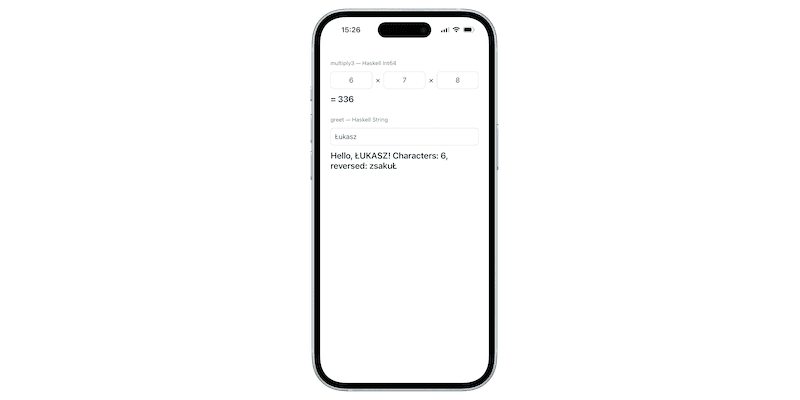
It works!
Summary
The only place where memory goes beyond the limit is the greet result. The resulting string is a C character string, so we transfer ownership to the caller. This ensures that Haskell’s garbage collector won’t clean it up, the block is outside the GHC heap. If we forget to free it in the C++ code, we’ll leave a memory leak. That’s why we use operator overloading:
struct HaskellStringDeleter {
  void operator()(char* str) const noexcept { haskell_free_string(str); }
};
Great :)
An interesting adventure; it would definitely be worth trying to compile for Android. While the author of jappeace/hatter uses a Linux virtual machine for compilation, that seems like way too much overkill to me. I think the better approach would be to enable cross-compilation directly on the aarch64-apple-darwin host—in other words, simply on a Mac.
For this attempt, I used several sources:
- Haskell 2010 Report, Chapter 8 FFI: formal specification of foreign import/export.
- GHC User’s Guide: -staticlib, RTS options (including -xr), -ddump-foreign.
- zw3rk/mobile-core-tools: the original mac2ios, the source of the trick involving rewriting the platform in assembly files.
- jappeace/hatter — Haskell on iOS and Android via Nix; this is where I borrowed the build concept itself (the author uses the Nix tool for cross-compilation, but I didn’t want to use it because, in the case of iOS, there’s no point anyway).,