Primjs by Lynx, but in React Native
Integrating the Lynx Engine with React Native
· 2 min read

Primjs is a JavaScript engine that is used in production in applications that use Lynx. The usage itself is quite similar to what Hermes offers in React Native. So I wanted to see how it would perform if I ported it over and used it in a React Native project.
While the communication model and architecture differ significantly between Lynx and React Native, the core remains the same: that is, they both use a JavaScript engine. Both Hermes and Primjs are engines that use ahead-of-time compilation, compiling code into intermediate bytecode during the compilation of the entire application. This provides significant optimization compared to traditional interpreters.
To that end, I created a library called react-native-primjs-engine, which we can use to integrate the engine directly into our React Native app.
Experiments
The experiments revealed some interesting findings. While the engine itself takes slightly longer to start up and uses more memory, it performed faster on devices in the SunSpider and Octane tests.
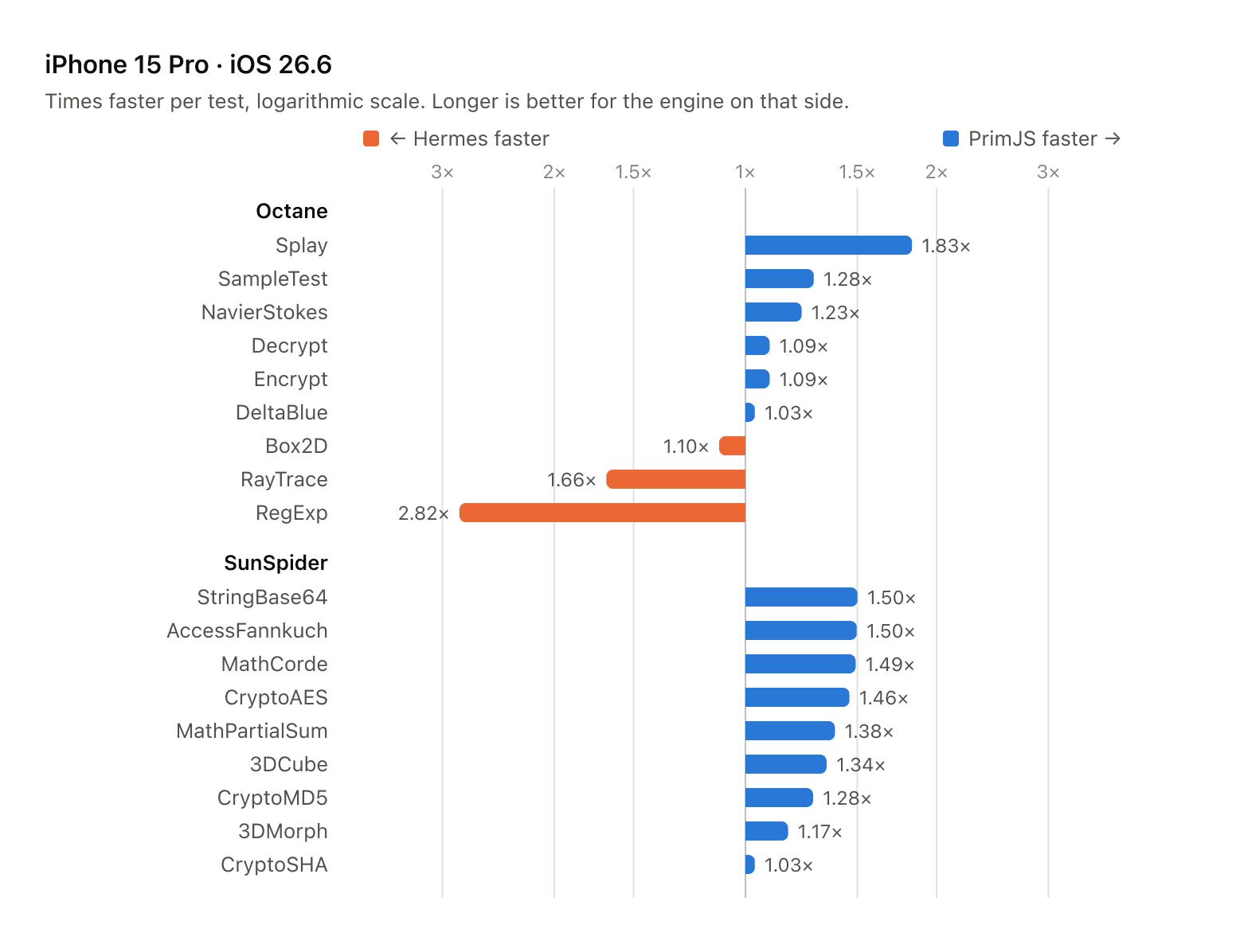
Time to interactive: Primjs: 68.3 ms; Hermes: 63.3 ms
Memory after startup Primjs: 45.4 MB; Hermes: 38.9 MB
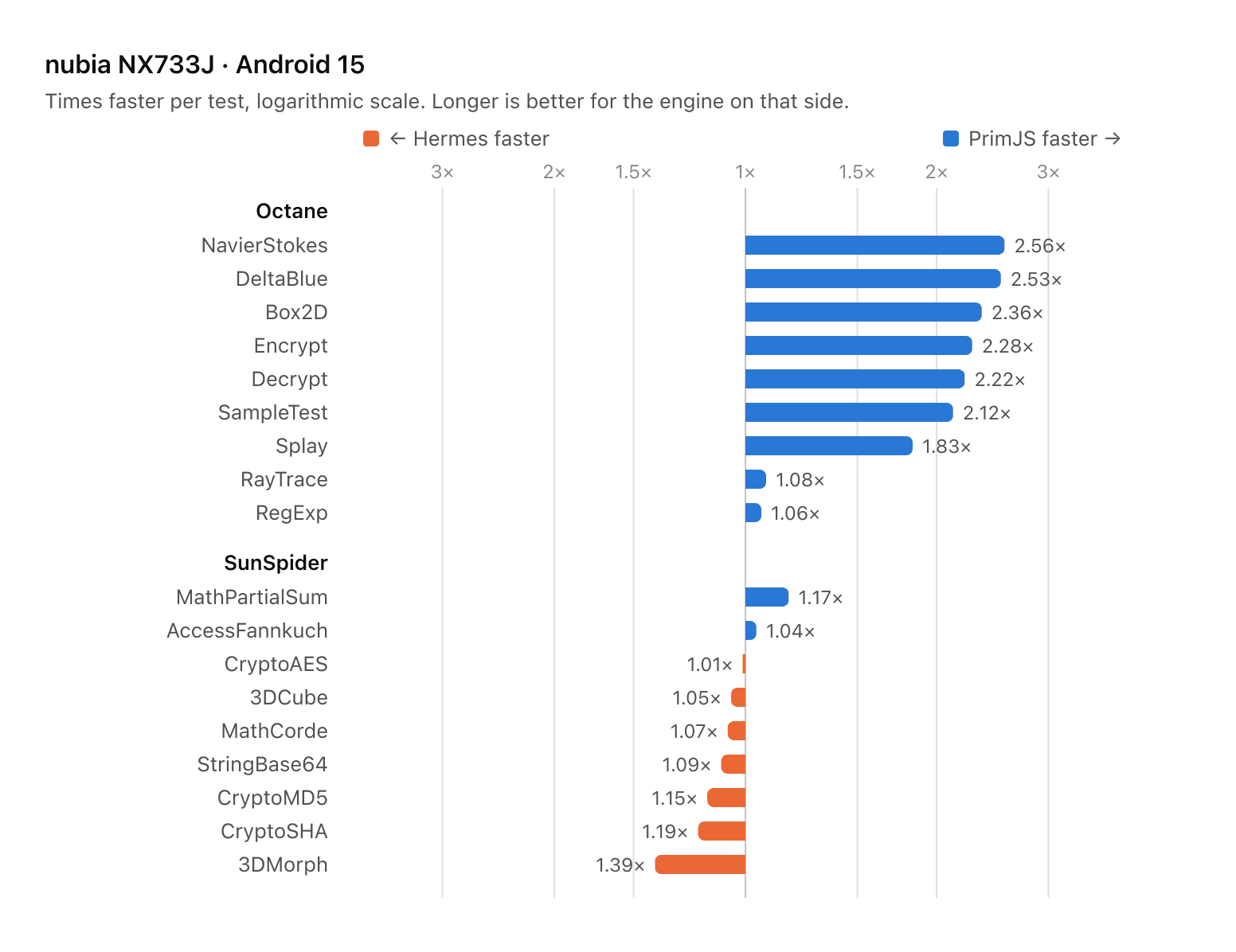
Time to interactive: Primjs: 60.8 ms; Hermes: 62.7 ms
Memory after startup Primjs: 99.5 MB; Hermes: 91.0 MB
Memory modes
PrimJS can be built two ways, and the choice is made at compile time.
- Tracing GC: fib(30) with execution time about 23 ms, but available only on arm64 arch.
- Reference counting (classic solution from QuickJS): fib(30) with execution time about 110 ms.
The GC build is the default wherever it is available: arm64 iOS devices and simulators, and arm64-v8a on Android. Other architectures fall back to reference counting automatically. Bytecode is the same in both modes.
Integration
npm install react-native-primjs-engine
cd ios && pod install
1. Babel
PrimJS implements roughly ES2020. The React Native preset leaves newer syntax untouched because Hermes understands it, so add two transforms to babel.config.js:
module.exports = {
  presets: ['module:@react-native/babel-preset'],
  plugins: [
    '@babel/plugin-transform-logical-assignment-operators',
    '@babel/plugin-transform-class-static-block',
  ],
};npm install --save-dev @babel/plugin-transform-logical-assignment-operators @babel/plugin-transform-class-static-blockNewer built-in functions (Array.prototype.at, Object.hasOwn, String.prototype.replaceAll, findLast, toSorted and friends) are added by the runtime at startup.
2. Android
android/gradle.properties:
hermesEnabled=falseMainApplication.kt:
import com.primjsengine.PrimJSRuntimeFactory

override val reactHost: ReactHost by lazy {
  getDefaultReactHost(
    context = applicationContext,
    packageList = PackageList(this).packages,
    jsRuntimeFactory = PrimJSRuntimeFactory(),
  )
}android/app/build.gradle: remove the else { implementation jscFlavor } branch from dependencies. With Hermes disabled the template would otherwise pull in JavaScriptCore.
3. iOS
AppDelegate.swift:
import PrimJSEngine

class ReactNativeDelegate: RCTDefaultReactNativeFactoryDelegate {
  // ...
  override func createJSRuntimeFactory() -> JSRuntimeFactoryRef {
    jsrt_create_primjs_factory()
  }
}ios/.xcode.env, so that the bundle is not compiled to Hermes bytecode:
export USE_HERMES=false4. Bytecode
Optional, and what makes startup competitive. Android, in android/app/build.gradle, after the React Native plugin:
apply from: "../../node_modules/react-native-primjs-engine/android/bytecode.gradle"iOS, in the Podfile, followed by pod install:
require_relative '../node_modules/react-native-primjs-engine/scripts/primjs_pods'

target 'MyApp' do
  # ...
  primjs_compile_bundle!
end
Checking that it works
PrimJSInternal is the counterpart of HermesInternal:
console.log(globalThis.PrimJSInternal);
// { version: '2.11.1-rc.1', commit: 'f78a8bb…', gc: true }